
There is a moment every frontend engineer eventually meets. The feature works. The design is signed off. Then real data arrives - ten thousand rows instead of the twenty in the mock - and the interface that felt weightless yesterday now stutters when you scroll, lags when you type, and takes half a second to react to a click.
Nothing is broken. You are simply asking the browser to hold ten thousand things in its hands at once.
The fix has an unglamorous name and an outsized payoff: virtualization, or, more descriptively, windowing. This article is about what a virtual window actually is, how to build one that survives contact with real UI, and the handful of details that separate a smooth list from a janky one.
The core idea: a window, not a list
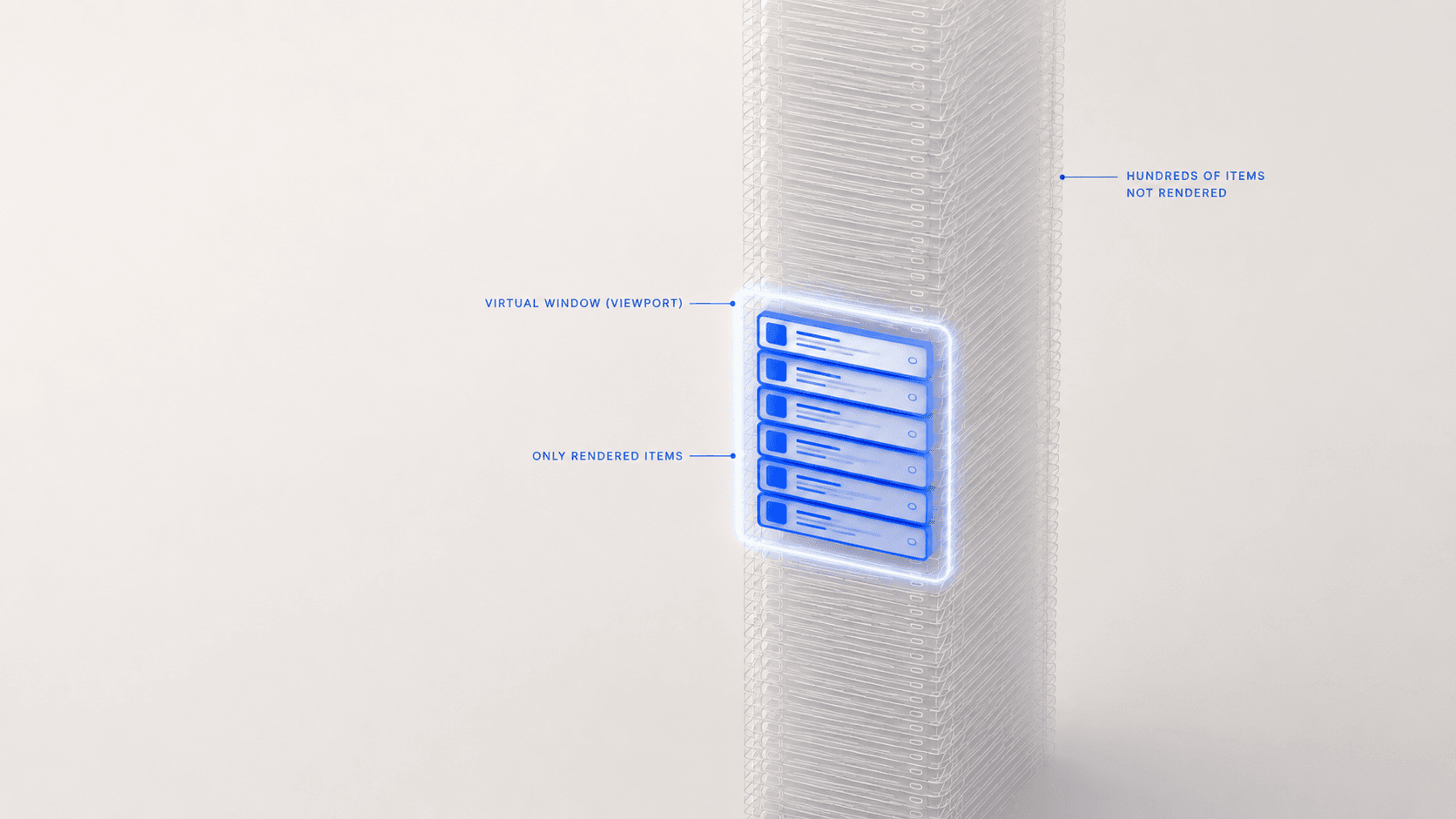
Look at a long scrollable list on screen. How many rows can you actually see? Twenty, maybe thirty. The other 9,970 exist in your data, but they are not visible, not readable, and not interactive. They are pure cost.
Windowing takes that observation literally:
Keep the full list in memory. Mount only the slice near the viewport in the DOM.
The user scrolls, the window slides, rows mount ahead and unmount behind. Memory holds the truth; the DOM holds a moving excerpt of it.
10,000 rows in state
~25 rows visible

without windowing:  ~10,000 mounted nodes (× several elements each)
with windowing:     ~20–50 mounted nodes
That is not a 10% optimization. It is a change of category - from "cost grows with your data" to "cost is a constant you choose."
Spacers: telling the browser the truth about height
If you mount 30 rows out of 10,000, the scrollbar instantly betrays you. The container thinks it is 30 rows tall, so there is nothing to scroll.
The classic solution is two empty divs - one above the window, one below - sized to represent everything you are not rendering:
<div ref={scrollRef} className="overflow-y-auto">
  <div style={{ height: topSpacerHeight }} />

  {visibleItems.map((item) => (
    <Row key={item.id} item={item} />
  ))}

  <div style={{ height: bottomSpacerHeight }} />
</div>
Two empty boxes doing the work of thousands of rows. scrollHeight stays honest, the scrollbar keeps its proper size and position, and anything else reading the container's scroll metrics - an infinite-scroll trigger, a "scroll to top" button, a sticky header - keeps working exactly as it did before.
That last point deserves emphasis. Many virtualization examples position rows absolutely inside a tall wrapper instead of using spacers. It is a fine technique, but it changes what scrollTop and scrollHeight mean for every other feature attached to that container. If something else already depends on those numbers, spacers are the lower-risk choice - they keep the scroll math identical to a plain, non-virtualized list.
Rows are not all the same height
Tutorials love fixed-height rows. Real products rarely have them. A row grows when it holds two lines of preview text, a badge, a divider, or an attachment chip.
You have two options, and only one of them is correct:
- Assume a constant height. Simple, fast, and wrong the moment a row wraps - the scrollbar drifts, jumps, and fights the user.
- Measure the real thing. Give each mounted row a
ResizeObserver, record its actual height, and feed that back into the offset math.
Measure. Then cache the measurement - critically, cached by the row's stable ID, not its position - so that once a row has been measured, it keeps contributing its true height to the spacers even after it scrolls away and unmounts. The longer a user scrolls, the more accurate the list becomes.
Until a row has ever been seen, you need an estimate. Pick a number close to your most common row's real height. It is not a fallback you tolerate; it is the number that decides whether the scrollbar settles gracefully or lurches when real measurements arrive.
Key by identity, not by index
This is the bug that will find you at the worst possible time.
Your list reorders. An item gets pinned to the top, a new event bumps something up, a filter removes half the rows. If you cached heights by index, every cached height is now attached to the wrong item - index 4's tall two-line height gets applied to whatever short row now sits at position 4.
// The list will reorder. Plan for it.
getItemKey: (index) => items[index].id,
Identity follows the row. Position does not. Same rule as React's key, and it matters here for exactly the same reason.
Don't walk the list - search it
Here is the trap that turns an optimization into a regression.
The obvious way to find the visible range is to walk from the top, accumulating heights until you pass scrollTop. That is O(N) per scroll event. Then you sum everything above for the top spacer - another pass. Then everything below - a third. Three full passes over ten thousand items, potentially many times per second, on the main thread, during a scroll gesture.
You have replaced a rendering problem with an arithmetic one.
The right shape is a cached offset index that you binary-search: O(log N) per scroll, with spacer offsets read directly off the result. This is precisely why mature virtualization libraries exist, and a good reason to reach for one rather than hand-rolling the offset walk. Whatever you use, know which of the two it is doing.
How big should the window be?
Mount only what is visible and users will see blank space during a fast flick, because scroll can outrun render. So you add overscan - extra rows kept mounted above and below the viewport as a buffer.
Resist picking a round number. Tie it to something meaningful in your system. If your list loads in pages of 30, an overscan of 30 means "one page above, one page below" - a buffer that scales with your actual data flow instead of a magic constant nobody can justify in review two months later.
Scrolling to something that isn't mounted
Deep links, search results, keyboard navigation, "jump to unread" - all of them need to scroll to an item that may not currently exist in the DOM. element.scrollIntoView() cannot help you: there is no element.
The window solves this too, because it knows every item's offset even for items it has not mounted. Scroll to the offset, let the range update, let the row mount on arrival.
const scrollToId = (id: string) => {
  const index = items.findIndex((item) => item.id === id);
  if (index === -1) return false;      // not in this list at all
  virtualizer.scrollToIndex(index, { align: 'start', behavior: 'smooth' });
  return true;
};
Return a boolean. Callers need to distinguish "scrolled there" from "that item isn't in the current filter" - they usually want to do something different in each case.
Rows can now unmount, and that changes your contracts
Before windowing, a row mounted once and stayed for the life of the list. Every ref, subscription, observer, and cached node lived quietly forever, and sloppy cleanup never hurt anyone.
After windowing, rows unmount constantly. Any registry keyed by row ID will happily accumulate references to detached DOM nodes unless every effect and ref callback tears itself down properly.
<div
  ref={(node) => {
    registerRow(id, node);
    return () => registerRow(id, null);   // now genuinely required
  }}
>
Windowing does not create these leaks. It reveals them.
Windowing is not pagination - and you probably want both
They sound similar and solve different problems:
- Pagination limits what you fetch. It is about network cost and time to first paint.
- Windowing limits what you render. It is about frame budget and interaction latency.
Fetch 10,000 rows in pages and render all of them, and scrolling still crawls. Render a window over 30 rows you never fetch more of, and the list simply ends. Apply the same instinct to both axes - keep a little ahead of the user in each - and the list feels genuinely fast: pages arrive before the user reaches the boundary, rows mount before they scroll into view.
The quiet win: everything per-row gets cheaper
The headline benefit is fewer DOM nodes. The benefit you feel day to day is different.
Every row in a real application does work: subscribes to state, formats a date, checks membership in a list of selected IDs, computes a derived flag. Un-windowed, all of that cost is multiplied by n, your total row count. Windowed, it is multiplied by v, your visible count - and v is a constant you chose.
render cost without windowing:  O(n)
render cost with windowing:     O(v),  v << n
A keystroke in a search box, a selection change, a badge update - each of these now touches roughly thirty components instead of thousands. That is the difference between an interface that responds and one that thinks about it first.
Two habits that compound with this:
- Replace repeated
array.includes(id)lookups with aSet. Five linear scans per row, per render, is a real cost hiding in plain JSX. - Build ID-to-index maps once per list change instead of calling
findIndexinside a render loop - otherwise your render isO(v × n)and windowing bought you nothing.
A short checklist
Before you ship a virtualized list:
- Measure real heights unless every row is provably identical.
- Key measurements by ID, so reordering and filtering do not corrupt them.
- Binary-search offsets; never walk the whole list on scroll.
- Justify your overscan by tying it to your page size or viewport, not a hunch.
- Provide a scroll-to-item path that works for unmounted rows.
- Audit every ref and subscription - rows unmount now.
- Test the ugly cases: filter down to one row, reorder while scrolled to the middle, resize the window, deep-link into row 8,000.
The takeaway
A virtual window is a small, honest lie: the browser is told a list is ten thousand rows tall while being handed thirty. Everything above turns that lie into something the user never notices - accurate measurements, stable identities, cheap arithmetic, disciplined cleanup.
Get it right and you stop paying for data your users cannot see. Your list renders in constant time, your interactions stay instant, and scale becomes a property of your data rather than a problem in your UI.
The best compliment a virtualized list can receive is that nobody ever mentions it.